> ## Documentation Index
> Fetch the complete documentation index at: https://docs.unosend.co/llms.txt
> Use this file to discover all available pages before exploring further.
# SMTP Integration
> Learn how to send emails using SMTP with Unosend. Connect your existing tools like Laravel, WordPress, Supabase, Django, and more.
Send emails using SMTP without the need for any external libraries or dependencies. Connect seamlessly with your existing tools and frameworks.
## SMTP Credentials
Use these credentials to connect any SMTP-compatible application to Unosend:
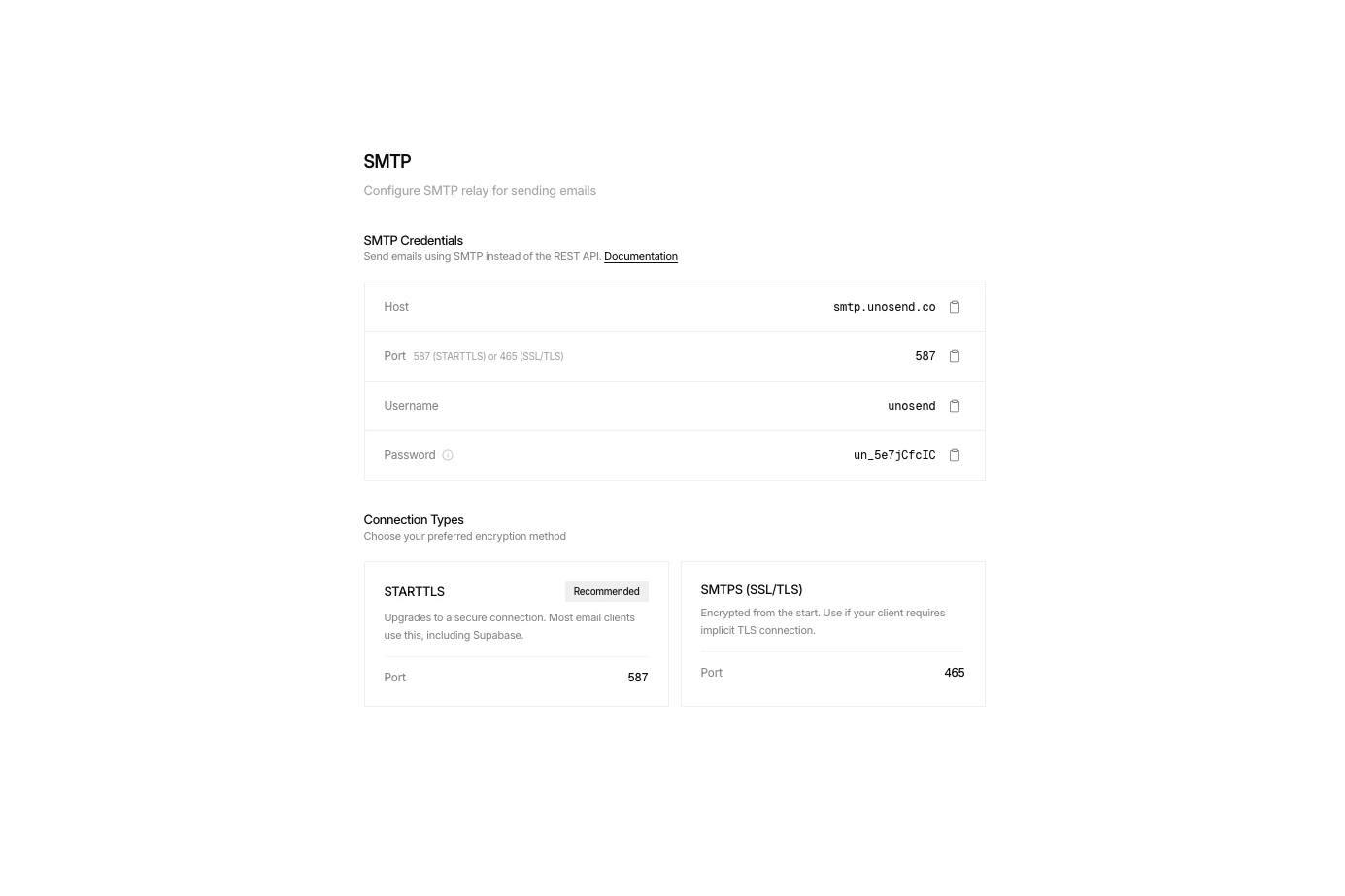 You can find your SMTP credentials in [Settings → SMTP](/settings?tab=smtp) or create a new API key in [API Keys](/api-keys).
## Connection Security
Upgrades the connection to secure. Works with most email clients and services like Supabase.
`Port 587`
Immediately connects via SSL/TLS. Use when your client requires implicit TLS.
`Port 465`
## Quick Start Examples
```javascript Nodemailer (Node.js) theme={null}
import nodemailer from 'nodemailer';
const transporter = nodemailer.createTransport({
host: 'smtp.unosend.co',
port: 587,
secure: false, // true for 465, false for 587
auth: {
user: 'emailapikey',
pass: 'un_your_api_key', // Your API key
},
});
async function sendEmail() {
const info = await transporter.sendMail({
from: 'hello@yourdomain.com',
to: 'user@example.com',
subject: 'Hello from Unosend!',
html: '
You can find your SMTP credentials in [Settings → SMTP](/settings?tab=smtp) or create a new API key in [API Keys](/api-keys).
## Connection Security
Upgrades the connection to secure. Works with most email clients and services like Supabase.
`Port 587`
Immediately connects via SSL/TLS. Use when your client requires implicit TLS.
`Port 465`
## Quick Start Examples
```javascript Nodemailer (Node.js) theme={null}
import nodemailer from 'nodemailer';
const transporter = nodemailer.createTransport({
host: 'smtp.unosend.co',
port: 587,
secure: false, // true for 465, false for 587
auth: {
user: 'emailapikey',
pass: 'un_your_api_key', // Your API key
},
});
async function sendEmail() {
const info = await transporter.sendMail({
from: 'hello@yourdomain.com',
to: 'user@example.com',
subject: 'Hello from Unosend!',
html: 'It works!
',
});
console.log('Message sent:', info.messageId);
}
sendEmail();
```
```python Python (smtplib) theme={null}
import smtplib
from email.mime.text import MIMEText
from email.mime.multipart import MIMEMultipart
smtp_host = "smtp.unosend.co"
smtp_port = 587
smtp_user = "emailapikey"
smtp_pass = "un_your_api_key" # Your API key
msg = MIMEMultipart()
msg['From'] = 'hello@yourdomain.com'
msg['To'] = 'user@example.com'
msg['Subject'] = 'Hello from Unosend!'
body = 'It works!
'
msg.attach(MIMEText(body, 'html'))
with smtplib.SMTP(smtp_host, smtp_port) as server:
server.starttls()
server.login(smtp_user, smtp_pass)
server.send_message(msg)
print('Email sent successfully!')
```
```env Laravel (.env) theme={null}
MAIL_MAILER=smtp
MAIL_HOST=smtp.unosend.co
MAIL_PORT=587
MAIL_USERNAME=emailapikey
MAIL_PASSWORD=un_your_api_key
MAIL_ENCRYPTION=tls
MAIL_FROM_ADDRESS=hello@yourdomain.com
MAIL_FROM_NAME="${APP_NAME}"
```
```python Django (settings.py) theme={null}
# Email configuration
EMAIL_BACKEND = 'django.core.mail.backends.smtp.EmailBackend'
EMAIL_HOST = 'smtp.unosend.co'
EMAIL_PORT = 587
EMAIL_USE_TLS = True
EMAIL_HOST_USER = 'emailapikey'
EMAIL_HOST_PASSWORD = 'un_your_api_key'
DEFAULT_FROM_EMAIL = 'hello@yourdomain.com'
```
```ruby Ruby on Rails theme={null}
# config/environments/production.rb
config.action_mailer.delivery_method = :smtp
config.action_mailer.smtp_settings = {
address: 'smtp.unosend.co',
port: 587,
user_name: 'emailapikey',
password: 'un_your_api_key',
authentication: :plain,
enable_starttls_auto: true
}
```
```text Supabase theme={null}
Host: smtp.unosend.co
Port: 587
Username: emailapikey
Password: un_your_api_key
Sender email: hello@yourdomain.com
```
## Email Tracking via SMTP
Track opens and clicks for emails sent via SMTP using custom headers. Add these headers to your email message to enable tracking:
| Header | Values | Description |
| ------------------------ | ------------- | ---------------------------------------------------- |
| `X-Unosend-Track-Opens` | `true` or `1` | Injects a tracking pixel to detect email opens |
| `X-Unosend-Track-Clicks` | `true` or `1` | Rewrites links to track clicks |
| `X-Unosend-Tags` | `tag1,tag2` | Add custom tags for categorization (comma-separated) |
Tracking headers are automatically removed before the email is delivered, so recipients won't see them.
### Examples with Tracking
```javascript Nodemailer (Node.js) theme={null}
const info = await transporter.sendMail({
from: 'hello@yourdomain.com',
to: 'user@example.com',
subject: 'Newsletter',
html: 'Hello!
Click here
',
headers: {
'X-Unosend-Track-Opens': 'true',
'X-Unosend-Track-Clicks': 'true',
'X-Unosend-Tags': 'newsletter,january'
}
});
```
```python Python (smtplib) theme={null}
msg = MIMEMultipart()
msg['From'] = 'hello@yourdomain.com'
msg['To'] = 'user@example.com'
msg['Subject'] = 'Newsletter'
msg['X-Unosend-Track-Opens'] = 'true'
msg['X-Unosend-Track-Clicks'] = 'true'
msg['X-Unosend-Tags'] = 'newsletter,january'
body = 'Hello!
Click here
'
msg.attach(MIMEText(body, 'html'))
```
```php Laravel theme={null}
use Illuminate\Support\Facades\Mail;
use Illuminate\Mail\Message;
Mail::send([], [], function (Message $message) {
$message->to('user@example.com')
->subject('Newsletter')
->html('Hello!
')
->getHeaders()
->addTextHeader('X-Unosend-Track-Opens', 'true')
->addTextHeader('X-Unosend-Track-Clicks', 'true');
});
```
```ruby Ruby on Rails theme={null}
class NewsletterMailer < ApplicationMailer
def welcome_email(user)
headers['X-Unosend-Track-Opens'] = 'true'
headers['X-Unosend-Track-Clicks'] = 'true'
headers['X-Unosend-Tags'] = 'newsletter,welcome'
mail(to: user.email, subject: 'Welcome!')
end
end
```
View open and click events in your [Analytics dashboard](/analytics) or receive them via [Webhooks](/webhooks).
## Supported Integrations
Unosend SMTP works with any application that supports SMTP:
## Next Steps
Verify your domain for better deliverability
Learn about advanced email options